

How to use YouTube Premium Services for free!

YouTube is one of the best platforms for watching entertainment videos, music, tutorials, gaming streams, and educational content. Millions of users spend hours daily enjoying their favorite creators. However, one major issue frustrates almost every user — annoying ads before and during videos.
Imagine watching your favorite video and suddenly getting interrupted by multiple advertisements. It ruins the experience, especially when you just want smooth entertainment.
So guys, today your host Divyanshu is going to tell you how you can enjoy your favorite videos ad-free with background play and premium-like features without spending money on a subscription.
Table of Contents
What is YouTube Vanced?
YouTube Vanced was a popular modified version of the YouTube app that allowed users to enjoy premium features for free. It became extremely popular among Android users because it offered a clean, ad-free experience along with several advanced features that were otherwise locked behind YouTube Premium.
The app was designed for users who wanted more control, customization, and uninterrupted video streaming.
Features of YouTube Vanced
1. Ad-Free Video Experience
The biggest advantage of YouTube Vanced was complete ad blocking. Users could watch videos without annoying interruptions, making binge-watching smooth and enjoyable.
Whether you were watching:
- Tech videos
- Music
- Podcasts
- Gaming streams
- Tutorials
there were no pre-roll or mid-roll ads disturbing your experience.
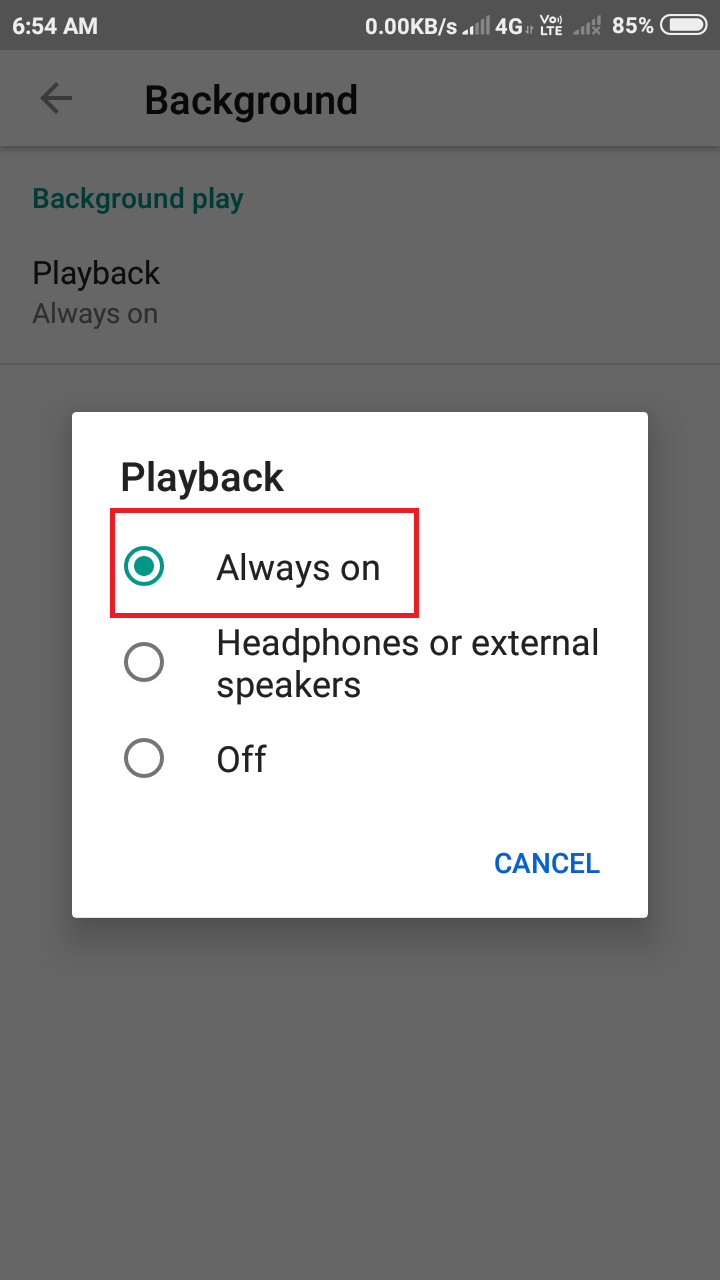
2. Background Play
One of the most loved premium features was background playback.
This allowed users to:
- Play music while using other apps
- Listen to podcasts with screen off
- Continue audio playback even after locking the phone

This feature was extremely useful for multitasking.
3. AMOLED Dark Mode
The app included a true black dark mode specially optimized for AMOLED displays. This not only looked premium but also helped save battery life on OLED smartphones.
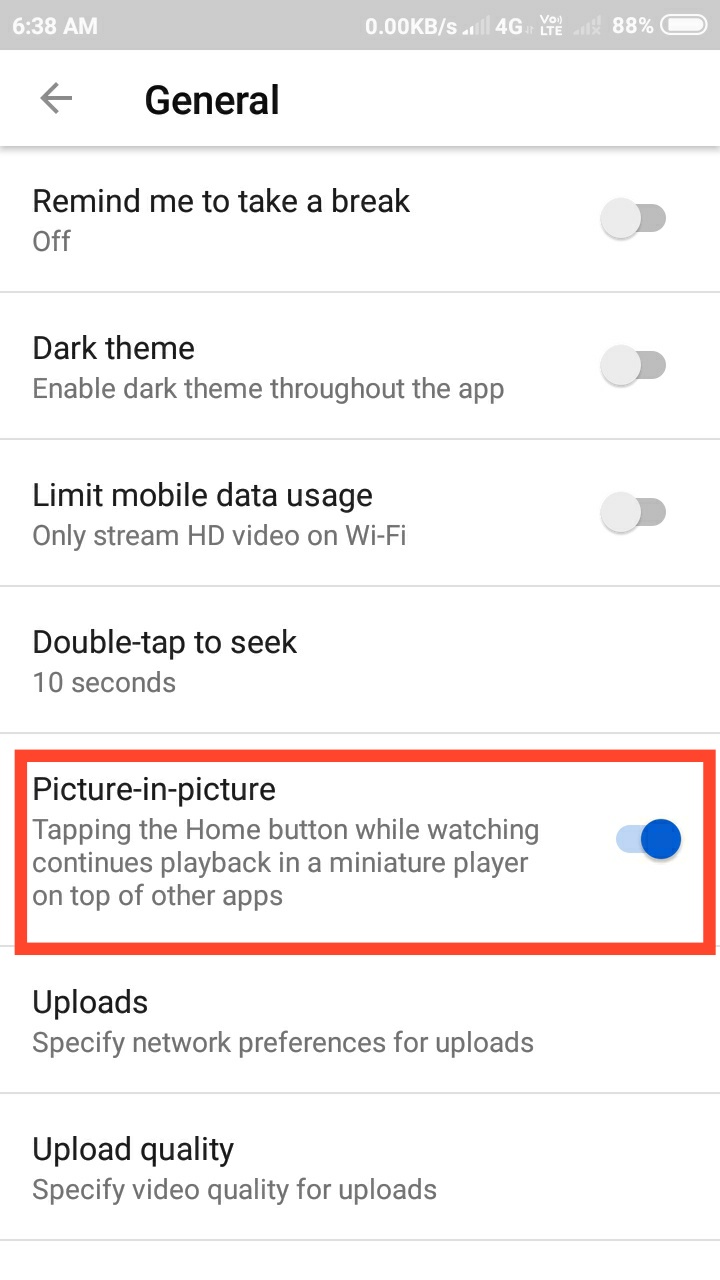
4. Picture-in-Picture Mode
Users could minimize videos into a floating window while using other applications simultaneously.
This feature made multitasking easier for:
- Students
- Professionals
- Content creators
5. Swipe Controls
YouTube Vanced introduced advanced swipe gestures for:
- Brightness control
- Volume control
similar to premium media player apps.


6. SponsorBlock Integration
One unique feature was automatic skipping of:
- Sponsorship segments
- Intros
- Outros
- Subscribe reminders
This saved viewers a lot of time.
Why Users Loved YouTube Vanced
The main reason behind its popularity was simple:
- Premium features for free
- Better customization
- No advertisements
- Smooth user experience
Many users considered it one of the best alternatives to official YouTube Premium.
Is YouTube Vanced Still Available?
The original YouTube Vanced project was officially discontinued in 2022. Because of this:
- Official updates stopped
- Compatibility issues started appearing gradually
- Security risks increased with unofficial downloads
Users should be careful while downloading modified applications from unknown websites because they may contain:
- Malware
- Viruses
- Data tracking scripts
Premium Features Include
1. Ad-free videos
2. Play videos in the background
To enable background play you need to go into settings and open the background tab, now select the ‘Always on’ option in Playback as illustrated below!
3. PIP Mode on Android 8.0+
To enable PIP mode go to the setting in the general tab and turn on the ‘PICTURE-IN-PICTURE’ option.
Increase or decrease brightness within the app
Go into the Vanced setting then go into swipe control then enable swipe control as illustrated below!
Also Read
How to download YouTube Vanced?
Download YouTube-vanced apk for free. Just click below to download the official Vanced apk and enjoy all your shows without any ads!
How to sign in YouTube vanced app?
If you want to personalize the Vanced app according to your choice then you need to sign-in to it. For signing in to the Vanced app, You need to download one more app called microg which helps you to sign in to Vanced app. Download Microg
Why Users Loved YouTube Vanced
The main reason behind its popularity was simple:
- Premium features for free
- Better customization
- No advertisements
- Smooth user experience
Many users considered it one of the best alternatives to official YouTube Premium.
Is YouTube Vanced Still Available?
The original YouTube Vanced project was officially discontinued in 2022. Because of this:
- Official updates stopped
- Compatibility issues started appearing gradually
- Security risks increased with unofficial downloads
Users should be careful while downloading modified applications from unknown websites because they may contain:
- Malware
- Viruses
- Data tracking scripts
Safe Alternatives to YouTube Vanced
If you want a safer experience, you can explore alternatives like:
- YouTube Premium
- NewPipe
- LibreTube
These apps provide better security and regular updates.
Final Thoughts
YouTube is undoubtedly one of the best entertainment platforms available today, but constant advertisements can sometimes spoil the viewing experience. YouTube Vanced became famous because it allowed users to enjoy videos ad-free along with premium-like features such as background playback, AMOLED dark mode, and advanced controls.
Although the original app has been discontinued, it still remains one of the most talked-about modified Android apps among tech enthusiasts.
If you prefer safety and long-term reliability, using official or open-source alternatives is always the better option.


I use the YouTube Vanced application on my Android phone for watching videos.
Yeah Edward its quite useful for students too!