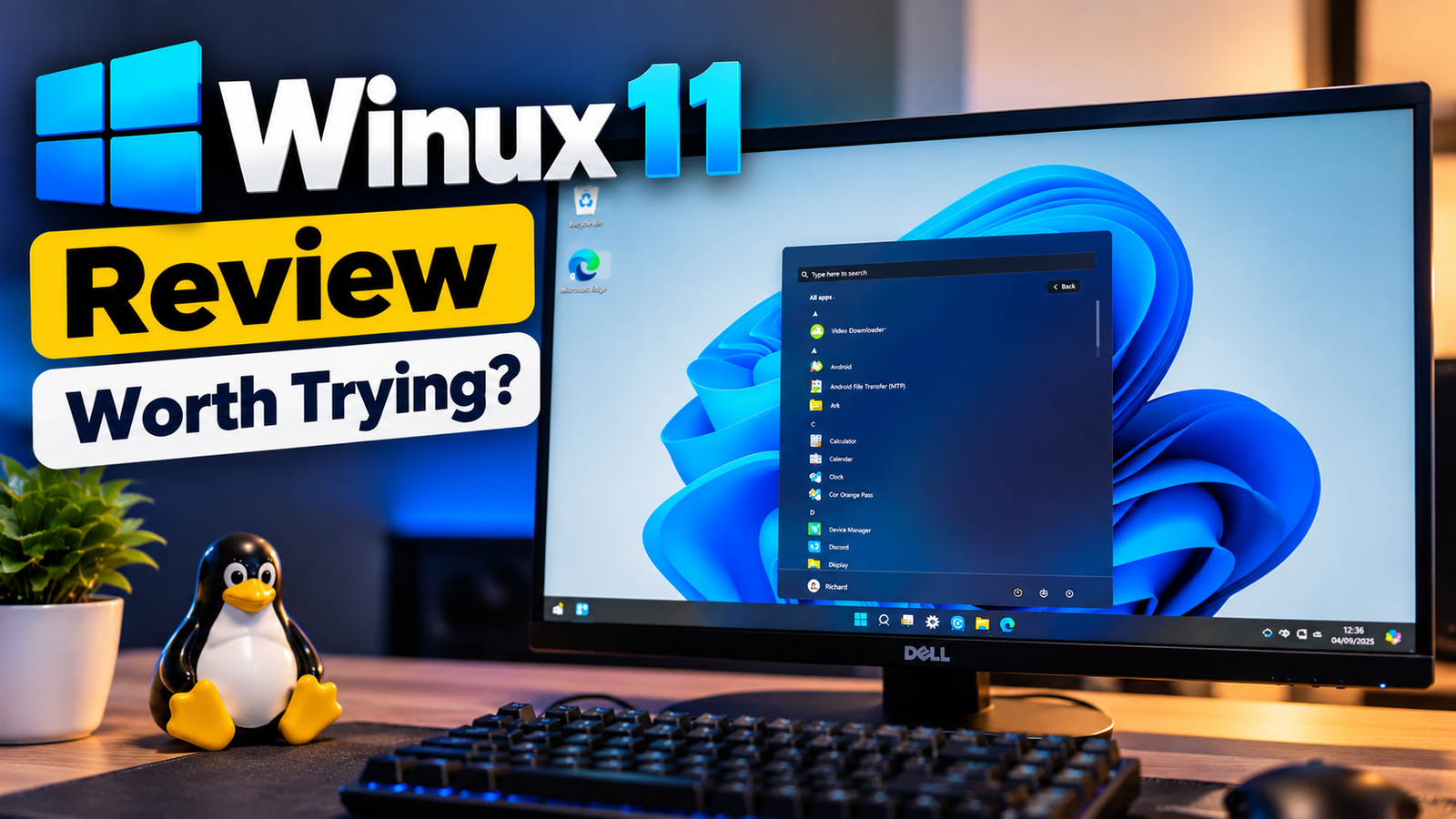
Winux 11 OS Review: Is This Windows-Like Linux Worth Trying?

Quick Answer: What Is Winux 11 OS ?
Winux 11 is an Ubuntu-based Linux distribution designed to resemble Windows 10 and Windows 11. It uses a customized KDE Plasma desktop to provide a familiar taskbar, Start menu, icons, and desktop layout. Winux can run many Linux applications and some Windows programs through compatibility tools such as Wine, but it is not a replacement for Windows software in every situation.
Introduction: Windows Looks Familiar, but Is Winux Really Windows?
Imagine switching on your computer and seeing a desktop that looks almost exactly like Windows 11. There’s a familiar taskbar, a Start menu, recognizable icons, and a layout that doesn’t force you to learn an entirely new way of working.
Now imagine that the operating system underneath isn’t Windows at all. That’s the idea behind Winux 11. It is a Linux distribution built around a simple promise: give Windows users a familiar desktop while allowing them to explore Linux. It is particularly interesting for people who want to move away from Microsoft’s operating system but aren’t enthusiastic about changing their everyday workflow.
At first glance, the idea sounds appealing. Linux can be installed without buying a Windows licence, offers access to a large open-source software ecosystem, and can give older computers a useful second life. However, switching operating systems involves more than changing the appearance of your desktop. Will your favourite applications work? Can you install your usual Windows programs? Is the experience suitable for everyday work, gaming, or programming? And is Winux 11 a sensible choice compared with established alternatives such as Linux Mint and Zorin OS?
Table of Contents
1. What Is Winux 11 OS?
Winux 11 is a Linux-based desktop operating system developed to provide a Windows-inspired computing experience. The project has previously been associated with the names Linuxfx and Wubuntu, so readers may encounter older reviews, screenshots, and tutorials that use those names.
The current project presents Winux 11 as an alternative for people who want to keep their computers useful while moving away from traditional Windows installations. Its desktop environment is customized to resemble Windows, making common actions such as opening applications, switching windows, and accessing settings feel familiar. Underneath that appearance, however, Winux remains Linux. It uses an Ubuntu-based foundation and the KDE Plasma desktop environment rather than Microsoft’s Windows kernel and native desktop platform. Its software management, system architecture, permissions, and application compatibility therefore follow Linux conventions.
That distinction matters. A Windows-like interface can make the first few hours more comfortable, but it cannot automatically make every Windows application, driver, game, or peripheral work as expected.
For readers who are curious about Linux but reluctant to abandon the layout they know, Winux offers an interesting starting point. The bigger question is whether its customizations provide enough practical value to justify choosing it over more established Linux distributions.
2. How Does Winux 11 OS work?
The easiest way to understand Winux is to separate its appearance from its underlying technology. Winux is a Linux-based operating system with a Windows-inspired interface, including familiar menus, icons, and a taskbar. However, it uses Linux technologies rather than the Windows operating system. Although it offers a familiar desktop experience, not all Windows applications are compatible. Winux is an interesting option for users exploring Windows alternatives and Linux distributions.
A familiar desktop on a Linux foundation
Winux uses a customized KDE Plasma desktop. KDE Plasma is a flexible Linux desktop environment that supports extensive customization of panels, menus, icons, themes, and window behaviour. Winux 11 OS builds on that flexibility to reproduce familiar Windows-style elements. The result is intended to reduce the learning curve for people who have spent years using Windows.
For example, a Windows user can approach Winux 11 OS expecting to find a taskbar, an application menu, desktop shortcuts, and graphical settings. The experience is not identical to Windows, but the visual similarities can make initial navigation easier.
Linux applications remain the natural choice
Because Winux is Linux-based, its most straightforward software options are applications that support Linux. Depending on the application, users can install software through graphical package managers, Ubuntu-compatible package sources, or other supported Linux distribution methods.
This is different from downloading a Windows installer and expecting it to work automatically.
What about Windows applications?
Winux promotes compatibility with Windows programs through tools such as Wine. Wine translates many Windows API calls into forms that Linux can use, allowing some Windows applications to run without a conventional Windows installation.
Nevertheless, Wine isn’t a complete Windows operating system. Compatibility varies by application, version, dependencies, graphics requirements, and configuration. A simple utility may work well while a specialised professional application may fail to launch or have missing features.
The important takeaway: Winux changes the desktop experience; it does not turn Linux into Windows.
ALSO READ >>> How to Speed Up a Slow Windows PC Without Spending Money
3. Winux 11 OS Features: What Do You Get?
Winux combines a familiar interface with Linux software and optional compatibility features. Here’s what deserves attention.
Windows-inspired interface
The most obvious feature is the Windows-style desktop. The taskbar, Start menu, icons, wallpapers, and overall layout aim to reduce the visual shock that some Windows users experience when switching to Linux.
For someone who mainly uses a browser, office applications, email, and file management, this familiar arrangement may be more useful than an unconventional desktop design.
However, not every setting or workflow will behave exactly as it does in Windows. Some parts of the system still expose Linux-specific tools and configuration options.
KDE Plasma customization
KDE Plasma provides the foundation for Winux’s visual flexibility. Its panels, widgets, themes, and desktop settings allow extensive customization.
That flexibility can be a strength for users who enjoy adjusting their computers. At the same time, extensive customization can make a distribution feel less consistent if different utilities follow different design conventions.
Windows application compatibility through Wine
Wine can help run selected Windows applications, including some traditional .exe and .msi programs. This may be useful for utilities that don’t have an equivalent Linux version.
However, compatibility should be checked application by application. Don’t assume that Microsoft Office desktop applications, Adobe Creative Cloud tools, specialist engineering software, or every Windows utility will work properly simply because Wine is included. Before switching, identify the applications you depend on and test their actual compatibility.
Everyday Linux software
Winux can access the Linux software ecosystem, including browsers, media players, programming tools, development environments, and other productivity applications.
For developers, Linux can be particularly useful for working with Git, shell scripting, programming languages, containers, and many open-source development tools. The precise experience depends on the packages and versions supplied by the installed Winux release.
Additional tools and optional features
The Winux project has promoted additional utilities and enhanced features through its PowerTools offering. The availability and licensing of specific features may depend on the edition and current release.
Before paying for an add-on, verify the current feature list, price, licence conditions, update policy, and whether the capability is essential to your workflow. A feature advertised on a project website should not be treated as independently verified performance evidence.
4. Winux OS System Requirements
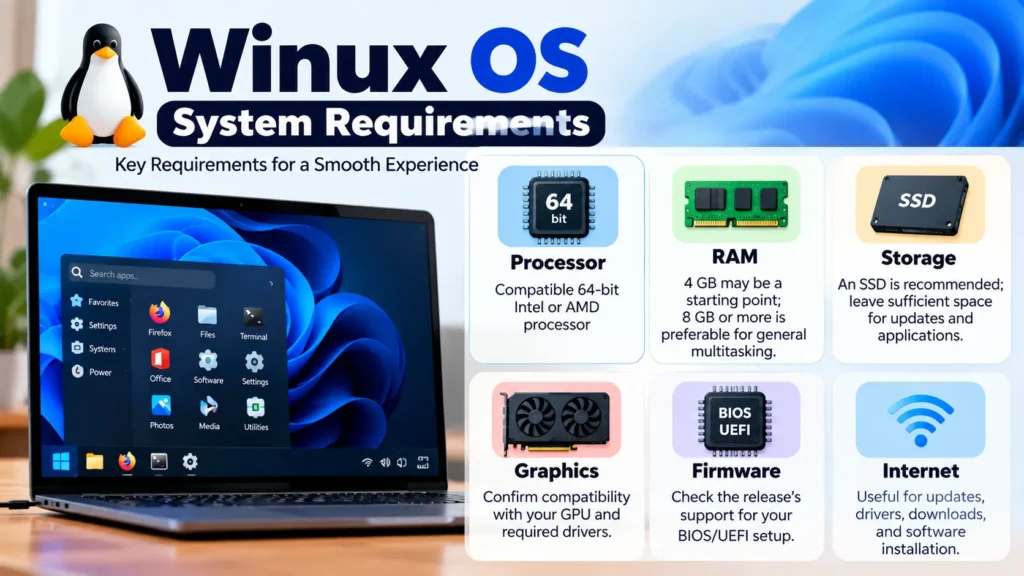
Winux’s Ubuntu-based foundation makes it an option worth investigating for compatible 64-bit PCs. However, the minimum requirements advertised by a distribution aren’t necessarily the same as the specifications needed for a comfortable everyday experience.
Older Winux documentation and reviews have cited relatively modest requirements, including around 3 GB of RAM and 25 GB of storage, with 4 GB of RAM and more storage recommended. These figures should be treated as historical guidance rather than a guarantee for every current release.
Check the system requirements for the exact ISO you intend to download before installing it. These are general planning recommendations, not a claim that every Winux release has identical requirements.
Can Winux 11 os be run on an old PC?
Potentially, yes. A computer that struggles with a newer Windows installation may still be useful with a Linux distribution, especially for web browsing, writing, programming, and basic productivity.
However, the desktop theme alone doesn’t determine resource usage. Background services, browser tabs, graphics drivers, installed applications, and the age of the hardware all affect performance.
If your computer has only 4 GB of RAM or an old mechanical hard drive, test Winux before committing to it. A lightweight alternative may be a better choice if performance is your main priority.
ALSO READ >>> How to Use Android Apps and Games on PC or Laptop (Easy Guide)
5. Can Winux 11 os Run Windows Applications?
One of the most important questions is whether it can run Windows applications. The short answer is yes, some Windows programs can run on Winux 11 OS, but compatibility is not guaranteed. Winux uses Linux-based technologies, including Wine where available, to help run supported Windows software without installing Windows itself. However, compatibility depends on the application, its version, system dependencies, and hardware requirements.
- Basic Windows applications: Some lightweight utilities may work with minimal configuration, but check compatibility with the specific application and version before installing.
- Professional software: Applications that require proprietary drivers, specialised hardware, complex licensing systems, or Windows-specific services may not work correctly. Test essential software before switching to Winux.
- Windows games: Some games can run through Linux compatibility technologies, but anti-cheat systems, DRM, game launchers, and graphics requirements can cause problems. Check recent compatibility reports for your specific games.
Is Winux a good Windows alternative? Winux may be suitable for everyday computing and supported applications, but users who rely on essential Windows-only software should verify compatibility before migrating. For the best results, check the official Winux documentation and current Wine or game compatibility reports for the programs you need.
What should you do before switching?
Make a list of your essential Windows applications. For each one, check whether a native Linux version exists, whether the developer officially supports Linux, or whether a compatibility layer has been confirmed to work.
For work-critical software, test the actual features you use rather than merely checking whether the program opens. A successful launch doesn’t prove that printing, file exchange, plugins, updates, or hardware integration will work correctly.
If your livelihood depends on a specific Windows-only application, keeping Windows available until you have a verified alternative is the safer approach.
1. Is Winux 11 OS a real operating system?
Yes. Winux is a Linux distribution built on an Ubuntu-based foundation. It uses a customized desktop designed to resemble Windows, but it is not Microsoft’s Windows operating system.
2. Is Winux 11 OS free to use?
The project offers Winux as a Linux operating system, but some additional features may have separate licensing or payment requirements. Check the current official release and pricing information before assuming every advertised feature is free.
3. Is Winux 11 OS better than Windows 11?
Not universally. Winux may appeal to users who want a Windows-style interface with a Linux foundation. Windows 11 remains the more straightforward choice for applications that specifically require Windows. The better option depends on your software, hardware, and workflow.
4. Can Winux 11 OS run .exe files?
Some Windows executables can run through Wine or related compatibility tools. However, compatibility varies by application, so you should test the exact program and version you need.
5. Can I use Microsoft Office on Winux 11 OS?
Don’t assume the full Windows desktop version of Microsoft Office will work reliably. Depending on your needs, you may be able to use web-based Office applications, compatible alternatives, or a specific supported configuration. Verify your required features before switching.
Final Verdict: Is Winux 11 OS Worth Trying?
Winux 11 has an appealing idea: let people explore Linux without giving up the desktop layout they already know. Its Windows-inspired interface and Ubuntu-based foundation make it worth investigating for users who value familiarity and want to experiment with a different operating system.
However, appearance is only one part of the decision. Windows application compatibility, hardware support, update practices, optional paid features, and the project’s changing history deserve careful consideration. If you want a straightforward Linux experience, Linux Mint or Zorin OS may be better starting points. If you need Windows-specific software to work reliably, don’t replace Windows until you’ve tested your essential applications