Firefox Corrupted Plugin Issue: Fix Unsigned Extensions

Quick Answer: The Firefox “appears to be corrupt” error does not always mean an extension is actually damaged. When developers install an unsigned XPI through the normal installation process, Firefox may reject it because standard Firefox releases require extensions to be signed. Other causes include an invalid manifest, incorrect XPI structure, or verification failure.
Introduction
You finish developing your Firefox extension. The code works. Your popup opens. Your content script runs. manifest.json looks fine. You package the project into an XPI and try to install it. Then Firefox responds:
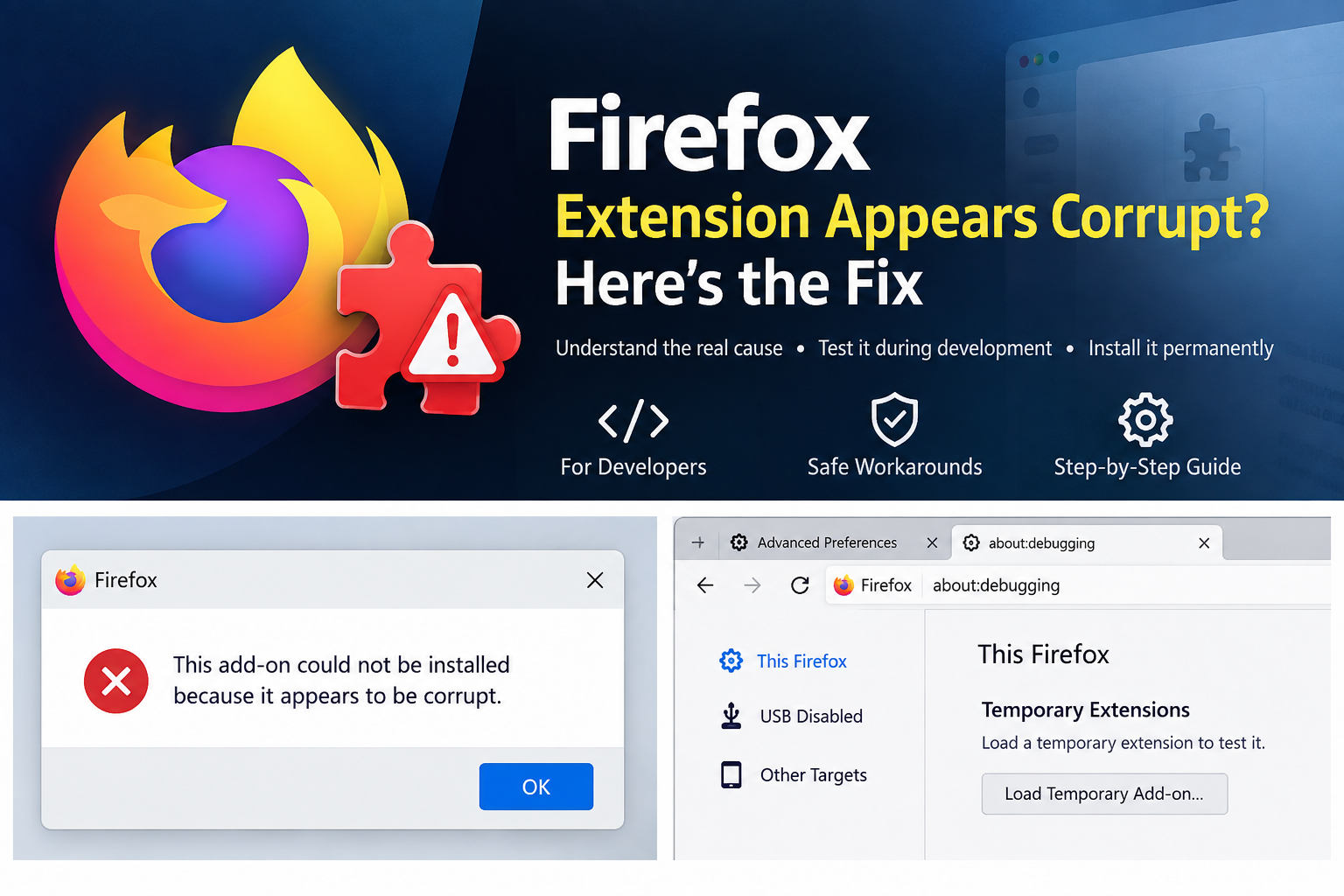
“This add-on could not be installed because it appears to be corrupt.”
Naturally, you start looking for a broken file. Maybe the ZIP is damaged. Maybe manifest.json is wrong. Maybe one of the JavaScript files is causing the problem. But here’s the part that confuses many extension developers:The extension may not actually be corrupt.
One important reason is Mozilla’s extension signing requirement. Standard Firefox release builds require most extensions to be digitally signed before they can be installed normally. An extension that is still under development and hasn’t gone through Mozilla’s signing process can therefore fail normal installation even though its source code is perfectly valid.
And that’s why searching for the Firefox corrupted plugin issue can lead you down the wrong path.You may be dealing with a signing problem, not a corruption problem. However, there is another important detail: not every “appears to be corrupt” message means an extension is unsigned. Invalid packaging, a bad manifest, missing files, certificate verification failures, or compatibility problems can also cause installation failures. So let’s separate these cases properly.
Table of Contents
What the “Appears to Be Corrupt” Error Really Means
The word “corrupt” makes the problem sound straightforward. It isn’t always. When Firefox installs an extension, several things can go wrong.
For example:
- The extension package may genuinely be damaged.
manifest.jsonmay be invalid.- Files may be packaged incorrectly.
- Required information may be missing.
- The extension may not satisfy signing requirements.
- Firefox may be unable to verify the extension’s signature.
- The extension may not be compatible with the Firefox version.
- A certificate or verification problem may exist.
- Security software may interfere with the package.
Mozilla’s support documentation lists multiple reasons extensions may fail to install, including compatibility, verification, corrupt files, and Firefox configuration.
So there are really two different questions:
Is the extension broken?
and:
Is Firefox refusing to install an otherwise valid extension?
Those aren’t the same thing.
Is Your Firefox Extension Actually Corrupt?
Maybe—but don’t assume it. For a developer, the fastest way to narrow this down is to test the extension through Firefox’s development workflow.
Suppose you have:
my-extension/
├── manifest.json
├── background.js
├── content.js
├── popup.html
├── popup.js
└── icons/
If you can load this extension temporarily through Firefox’s debugging interface and it works, that’s a very useful clue.
It means your basic extension structure and code may be fine.
The problem may instead be related to how you’re trying to permanently install the XPI.
Diagnostic table
| What happens | Likely area to investigate |
|---|---|
| Temporary loading works, normal XPI install fails | Signing/installation path |
| Temporary loading fails | Manifest, files, permissions, compatibility |
| XPI cannot be opened | Damaged/malformed archive |
| Manifest cannot be parsed | Invalid JSON/configuration |
| Firefox says extension is unsigned | Signing/verification |
| Signed extension suddenly fails verification | Certificate/signature problem |
| Extension works in one Firefox channel but not another | Channel/configuration difference |
This is why simply changing random Firefox settings isn’t a good first step.
Your extension can be perfectly valid and still fail normal installation.
Imagine you’ve created a WebExtension with:
manifest.json
background.js
popup.html
popup.js
Everything works during development. But you package it as:
my-extension.xpi
and attempt to install it through the normal Firefox add-on installation interface.
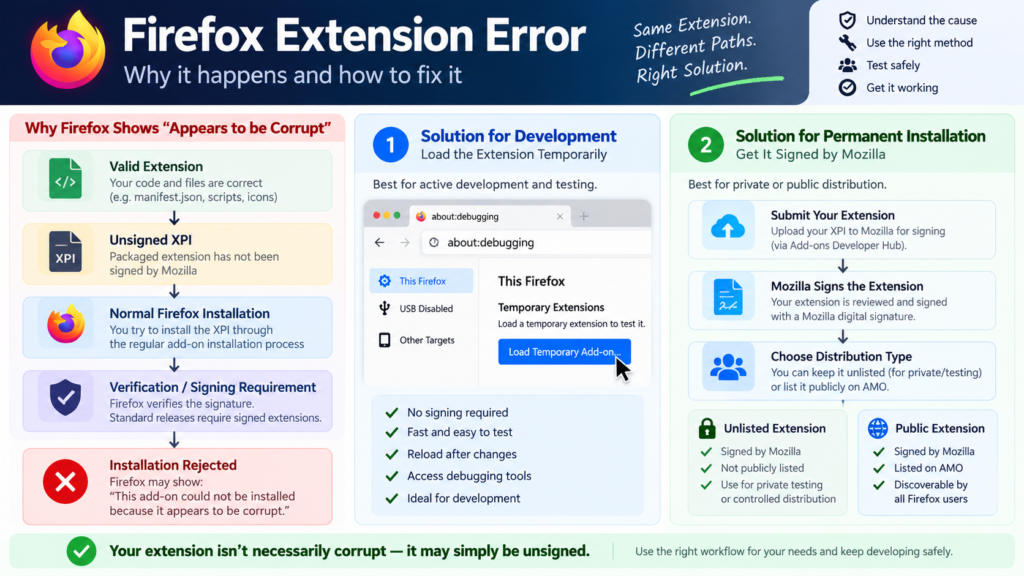
If the extension hasn’t been signed appropriately, a standard Firefox release can reject it because Firefox requires most extensions to have a Mozilla digital signature.
That is fundamentally different from:
XPI archive is damaged
The extension might be completely valid from a development perspective. The issue is that normal Firefox installation and local development have different requirements.
This is the key explanation behind many searches for: “Firefox extension appears to be corrupt unsigned.”
Development Extension vs Production Extension
A Firefox extension usually goes through two very different stages: development and production. Understanding the difference can make the Firefox corrupted plugin issue much easier to diagnose.
Development vs Production
During development, you’re mainly writing and testing your extension. You typically work with local files, make frequent changes, load the extension temporarily, debug errors, reload it, and check the browser console as you iterate. At this stage, you don’t need to release the extension publicly.
Once you’re ready for production, the focus changes to distributing the extension to other users. You need proper packaging, Mozilla signing where required, version management, security checks, and compatibility testing. Trying to install an unfinished development XPI as though it were a production extension is where things can become confusing, especially when Firefox rejects the package during normal installation.
The difference
| Development | Production | |
|---|---|---|
| Local code | Yes | Usually source of build |
| Temporary loading | Yes | No |
| Debugging | Essential | Limited |
| Mozilla signing | Not required for temporary loading | Required for standard release installation |
| Public listing | No | Optional/depends on distribution |
| Main purpose | Development | User distribution |
Mozilla’s current WebExtension tutorial specifically recommends temporary loading through about:debugging while developing.
The Easiest Solution: Load It Temporarily
If you’re actively developing your own extension, don’t start by trying to permanently install the XPI. Use Firefox’s temporary extension workflow. This is designed for exactly the situation you’re in.
The development cycle becomes:
Write code
   ↓
Load extension temporarily
   ↓
Test
   ↓
Check errors
   ↓
Modify code
   ↓
Reload
   ↓
Test again
Mozilla’s current documentation describes this workflow through about:debugging.
It’s fast, simple, and doesn’t require you to turn off security protections in your everyday Firefox installation.
How to Test a Local Firefox Extension with about:debugging
Step 1: Open Firefox
Launch the Firefox installation you’re using for development.
Step 2: Open about:debugging
Enter:
about:debugging
in the address bar.
Step 3: Choose “This Firefox”
In the debugging interface, select:
This Firefox
Step 4: Choose “Load Temporary Add-on”
Select the option to load a temporary extension.
Step 5: Select your extension
Navigate to your extension’s project directory.
Firefox can load the extension by selecting a file such as manifest.json.
Mozilla’s current documentation explicitly describes selecting a file from the extension directory when loading a temporary add-on.
Step 6: Test the extension
Now test:
- Popup
- Content scripts
- Background scripts
- Permissions
- Storage
- Network requests
- Browser APIs
- Context menus
- Tabs
- Messages between components
Step 7: Check the debugging information
If something fails, inspect the errors.
This is one of the biggest advantages of temporary loading.
You can find out whether the problem is:
- JavaScript
- Manifest
- Permissions
- API compatibility
- Missing files
- Content-script configuration
instead of relying on a vague installation error.
What If Temporary Loading Works?
This is one of the most useful clues when troubleshooting the Firefox corrupted plugin issue.
Suppose:
Temporary installation: Works
Normal XPI installation: Fails with “appears to be corrupt”
If that happens, investigate the installation and signing path before rewriting your extension or changing its code.
Your code may be fine. Your extension may be fine. The problem may simply be that a standard Firefox release is rejecting the unsigned development XPI during normal installation.
That’s where Mozilla extension signing becomes relevant. For active development, you can continue using Firefox’s temporary extension workflow. If you need a permanently installable extension, getting it signed by Mozilla is the appropriate next step.
What If Temporary Loading Also Fails?
Then investigate the extension itself.
Start with:
manifest.json- JSON syntax
- Extension ID
- Background scripts
- Content scripts
- Permissions
- File paths
- Icons
- WebExtension APIs
- Browser compatibility
- XPI structure
- Console errors
Don’t change everything at once. Instead, isolate the problem.
Check Your manifest.json
Your manifest is one of the first things to inspect. A basic Manifest V3 extension might look conceptually like:
{
  "manifest_version": 3,
  "name": "My Test Extension",
  "version": "1.0",
  "description": "A Firefox extension for development testing",
  "action": {
    "default_popup": "popup.html"
  }
}
Your real extension may need considerably more configuration.
Check for:
- Invalid JSON
- Missing commas
- Unsupported properties
- Incorrect permissions
- Incorrect file paths
- Invalid background configuration
- Incorrect content-script configuration
- Missing required extension ID information where applicable
Don’t copy Chrome-specific configuration blindly.
Firefox and Chrome both support WebExtensions, but their implementation details aren’t identical.
Check Your XPI Package
Packaging is another major cause of installation problems. A common mistake is accidentally creating:
extension.xpi
└── my-extension/
    ├── manifest.json
    ├── background.js
    └── popup.html
instead of having the extension files at the expected level:
extension.xpi
├── manifest.json
├── background.js
└── popup.html
The manifest needs to be where Firefox expects it. Also check whether your archive is actually valid.
Remember:
Renaming .zip to .xpi doesn’t repair a broken extension.
If the archive is malformed, rebuild it.
Mozilla Signing: The Better Solution for Permanent Installation
Now we get to the solution that many developers actually need. Suppose you’re finished testing and want the extension to be installed normally rather than temporarily.
In a standard Firefox release, the appropriate path is to have the extension signed by Mozilla. Mozilla states that extensions must be submitted for signing even when they are distributed outside addons.mozilla.org.
This is important because it means: You don’t necessarily need to make your extension publicly discoverable on AMO just to obtain a signed extension.
That’s the distinction many articles fail to explain.
Can You Get a Firefox Extension Signed Without Publishing It Publicly?
Yes, Mozilla’s add-on ecosystem distinguishes between having an extension signed and having it listed publicly.
For a private or controlled distribution scenario, you can submit an extension for signing without making it publicly listed on the Mozilla Add-ons website. This is commonly referred to as an unlisted extension.
The concept is:
Your extension
      ↓
Submit to Mozilla
      ↓
Mozilla signing/review process
      ↓
Signed XPI
      ↓
Private/controlled distribution
The extension doesn’t have to become a publicly discoverable AMO listing simply because you need Mozilla’s signature.
Mozilla support discussions also specifically point developers toward the unlisted option for private-use extensions.
This is a much better solution when your goal is:
“I want my own extension to install normally, but I don’t want to publish it publicly for everyone to find.”
Temporary Testing vs Mozilla-Signed Unlisted Extension
This is the comparison I would put prominently in the article.
| Method | Best For | Mozilla Signature | Public AMO Listing | Permanent Installation |
|---|---|---|---|---|
| Load Temporary Add-on | Active development | Not required for temporary loading | No | Temporary |
| Mozilla-signed unlisted extension | Private/controlled distribution | Yes | No | Yes, subject to Firefox requirements |
| Public AMO extension | Public distribution | Yes | Yes | Yes |
| Developer/Nightly workflow | Advanced development | Configuration-dependent | No | Development-oriented |
Which should you choose?
If you’re changing code every few minutes: Use temporary loading. If the extension is ready and you need a properly signed build for yourself or a controlled group: Use Mozilla’s signing process and choose the appropriate unlisted distribution option.
If you’re ready for everyone to discover and install it: Publish it through AMO.
That’s the clean distinction.
What About Firefox Developer Edition and Nightly?
Firefox has development-oriented channels that provide more flexibility for extension developers.
Mozilla’s current support documentation states that Firefox Developer Edition and Nightly can be used for testing scenarios where signature enforcement needs to be bypassed, while standard Firefox release builds do not provide that same flexibility.
That makes these versions useful for advanced development workflows.However, don’t confuse this with the recommended solution for every developer.
If your extension can be tested through:
about:debugging → This Firefox → Load Temporary Add-on
there is usually no reason to weaken signature enforcement just for ordinary development. And if you need a permanently installable extension, Mozilla signing is generally the cleaner route.
Should You Disable Firefox Signature Checking?
For a normal Firefox release installation:
No—not as your first solution.
Old tutorials frequently recommend changing:
xpinstall.signatures.required
to:
false
But this is not a universal solution for standard Firefox releases.
Mozilla currently documents signature-enforcement exceptions for specific development-oriented Firefox versions and ESR configurations, with explicit warnings about the security implications.
So don’t blindly copy an old about:config tutorial.
Instead:
For active development
Use temporary loading.
For private permanent distribution
Get the extension signed and use an unlisted distribution where appropriate.
For advanced development environments
Use the Firefox channel/configuration that Mozilla currently documents for that purpose.
That approach is safer and easier to maintain.
The Real Causes of the Firefox Corrupted Plugin Issue
Here’s the section that should answer the searcher’s actual question. The “appears to be corrupt” error can have multiple causes.
1. Unsigned extension
Your extension may be valid but not signed for normal installation. This is especially relevant to developers trying to install their own XPI.
2. Invalid manifest
The manifest.json may contain invalid JSON or unsupported configuration.
3. Incorrect XPI structure
Your manifest may be buried inside another directory.
4. Missing extension ID
Some installation/signing workflows require an appropriate Gecko extension ID configuration.
5. Signature verification failure
Firefox may be unable to verify the extension’s signature.
6. Certificate problems
A signing certificate or verification problem can prevent installation.
7. Outdated Firefox
Older Firefox builds can have certificate or extension-verification issues. Mozilla support has documented cases where updating Firefox resolved add-on verification problems.
8. Damaged XPI
The archive itself may genuinely be corrupted.
9. Modified signed extension
If a signed extension is modified after signing, the signature can become invalid.
10. Security software interference
In some cases, security software can interfere with extension packages or signatures. Mozilla support has documented cases involving security software and extension installation.
So the correct conclusion is:
“Appears to be corrupt” is an installation failure message, not proof by itself that your extension’s source code is corrupted.
Also Read >>> How Web Cookies Work ? Top 5 Things to Know
Myth vs Reality
Myth: “Firefox says corrupt, so my extension is broken.”
Reality: It can be a packaging, manifest, signing, certificate, compatibility, or verification problem.
Myth: “Unsigned means corrupted.”
Reality: An unsigned extension can be perfectly valid code. The issue is that standard Firefox release builds require signing for normal installation.
Myth: “I must publish my extension publicly on AMO.”
Reality: Mozilla supports signing/distribution workflows where an extension can remain unlisted rather than publicly discoverable.
Myth: “I need to disable Firefox security to develop extensions.”
Reality: Temporary loading through about:debugging is specifically intended for extension development and testing.
Myth: “Renaming ZIP to XPI fixes everything.”
Reality: The package still needs the correct structure and valid manifest.
Myth: “Developer Edition makes every extension automatically install.”
Reality: Your extension still needs valid configuration, and the exact behavior depends on the Firefox channel and current development settings.
Complete Troubleshooting Checklist
Before changing advanced Firefox settings, work through this list:
- Firefox is updated
manifest.jsonis valid- Required files exist
- Manifest paths are correct
- XPI structure is correct
- Extension ID is configured where required
- Permissions are valid
- Firefox APIs are supported
- Extension loads through
about:debugging - Console errors have been checked
- The extension is actually intended for your Firefox version
- You know whether you’re doing temporary testing or permanent installation
- Signing requirements are understood
- Mozilla’s current signing/distribution workflow has been checked
- A private/unlisted signing route has been considered if public listing isn’t wanted
Frequently Asked Questions
Why does Firefox say my extension appears to be corrupt?
The message does not necessarily mean the extension files are damaged. An unsigned extension, invalid manifest, incorrect XPI structure, signature verification failure, certificate problem, compatibility issue, or genuinely corrupt archive can cause installation problems. If you’re developing the extension, first try loading it through about:debugging.
Can an unsigned Firefox extension appear to be corrupt?
Yes, an unsigned development extension can be rejected when you attempt normal installation in a standard Firefox release because most extensions need Mozilla’s digital signature. The important distinction is that the extension itself may be perfectly valid even though Firefox won’t accept it through the normal installation path.
How can I test an unsigned Firefox extension?
For active development, use about:debugging, select This Firefox, and choose Load Temporary Add-on. This is the straightforward development workflow documented by Mozilla.
Can I permanently install my private Firefox extension?
If you need permanent installation in a standard Firefox release, the extension generally needs to be signed. Mozilla provides signing/distribution workflows for extensions that don’t necessarily need to be publicly listed on AMO.
Can I get my Firefox extension signed without publishing it publicly?
Yes. An extension can be submitted for signing as an unlisted add-on rather than being publicly listed on Mozilla Add-ons. This is useful for private or controlled distribution. Mozilla’s documentation distinguishes signing from public listing.
What is the safest workaround for an unsigned extension?
For active development, temporary loading through about:debugging is usually the simplest approach. If you need a permanently installable build, use Mozilla’s current signing process instead of weakening security settings in your everyday Firefox installation.
Why won’t my XPI file install even though it works in about:debugging?
If temporary loading works but normal XPI installation fails, investigate signing, verification, extension ID requirements, and the Firefox installation channel. Your source code may not be the problem.
What should I check if temporary loading fails too?
Start with manifest.json, JSON syntax, file paths, permissions, extension IDs, background scripts, content scripts, browser compatibility, and the extension debugging console. Also verify that the manifest is located correctly inside the extension package.
Do I have to publish my extension on AMO to get it signed?
No. Mozilla’s current documentation states that extensions must be submitted for signing even when distributed outside AMO, and an extension can be distributed without being publicly listed.
Does Firefox require extensions to be signed?
Standard Firefox release builds require most extensions to be digitally signed by Mozilla. Mozilla provides different development workflows and special Firefox configurations for developers and advanced users.
Conclusion
The Firefox corrupted plugin issue doesn’t always mean your XPI is actually broken. An unsigned extension, invalid manifest, packaging problem, or verification issue can also cause normal installation to fail. If it works through about:debugging but not during normal installation, check the signing requirement first. For development, use temporary loading; for permanent use, get the extension signed by Mozilla, including unlisted distribution when appropriate. Is your extension really corrupt, or does it simply need the right signing and installation path?