
How to Use Android Apps and Games on PC or Laptop (Easy Guide)

Want to run android apps and games on PC? You’re in the right place. In this guide, you’ll learn simple and effective methods to use your favorite Android apps and games on your laptop or desktop. Using Android emulators, you can easily enjoy apps like WhatsApp, Instagram, and Facebook Messenger, and play games like Subway Surfers, Temple Run, and Candy Crush on a bigger screen.
Table of Contents
What is an Android Emulator?
An Android emulator is software that creates a virtual Android device on your PC. It allows you to install and run android apps and games on PC just like a smartphone.
1. Using BlueStacks (Best Overall)


You can download Bluestack from its official website:- Bluestack
Don’t worry I will guide you step by step.
Why use BlueStacks?
- Easy to use interface
- High performance for gaming
- Supports most Android apps
How to Install BlueStacks
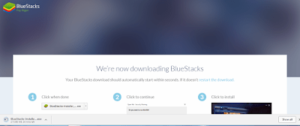
Step 1: Download BlueStacks from the official website
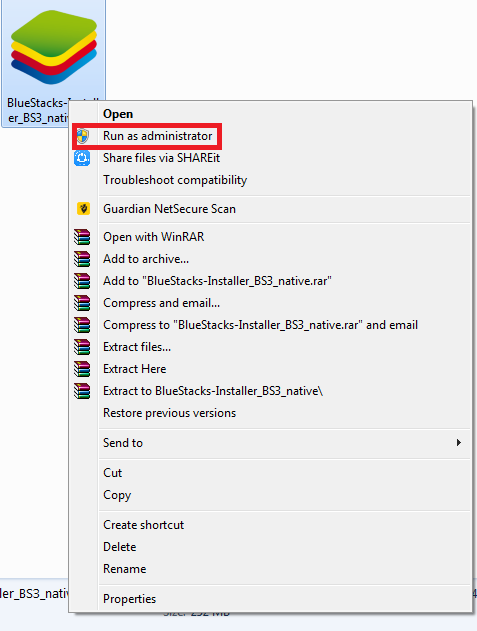
Step 2: Run the setup file as administrator
Step 3: Click on “Install Now”
Step 4: Wait for installation to complete
- Step 1-Download Bluestacks setup file into your pc
- Step 2-Run the setup file as administrator
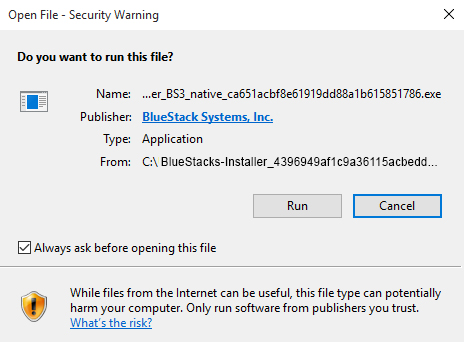
- Step 3-Click on Run
Step4- Agree to the terms and conditions and click on Install now
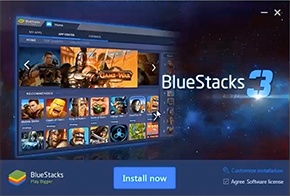
After installation:
- Sign in with your Google account
- Open Play Store
- Install apps and games
2. Using KO Player (Good for Gaming)


Why use KO Player?
- Lightweight emulator
- Good for low-end PCs
- Smooth gaming experience
How to Install KO Player
Step 1: Download KO Player from its official website
Step 2: Run the setup file
Step 3: Select language
Step 4: Accept terms and click Next
Step 5: Complete installation
Now install your favorite apps and games directly.
What Can You Do After Installation?
Once installed, you can:
- Run android apps like WhatsApp, Instagram
- Play android games on PC with better controls
- Use keyboard and mouse for gaming
- Enjoy bigger screen experience
Alternative Options
You can also try:
- NoxPlayer
- LDPlayer
These are also good for running android apps and games on PC smoothly.
Tips for Better Performance When Running Android Apps and Games on PC
o get the best experience while running android apps and games on pc, your system setup and optimization play a very important role. Even the best emulator can lag if your PC is not properly configured. Follow these detailed tips to ensure smooth performance.
First, make sure your PC has at least 8GB RAM. Android emulators like BlueStacks or NoxPlayer require sufficient memory to run apps smoothly. If your system has only 4GB RAM, you may face lag, crashes, or slow loading times when running android apps and games on pc.
Second, enable virtualization (VT) in BIOS. This is one of the most important steps that many users ignore. Virtualization allows your processor to handle emulators more efficiently, significantly boosting performance. Once enabled, you will notice faster app loading, smoother gameplay, and better multitasking while using android apps and games on pc.
Another important step is to close unnecessary background applications. Programs running in the background consume CPU and RAM, which reduces the resources available for your emulator. Before launching your emulator, close apps like browsers, media players, or other heavy software to ensure maximum performance.
Finally, using an SSD (Solid State Drive) instead of a traditional hard drive can make a big difference. SSDs offer faster read and write speeds, which means quicker emulator startup, faster app installation, and smoother overall performance when running android apps and games on pc.
By following these optimization tips, you can significantly improve speed, reduce lag, and enjoy a seamless experience while using android apps and games on pc.
Conclusion
Using Android emulators, it is very easy to run android apps and games on PC. Tools like BlueStacks and KO Player provide a smooth and user-friendly experience.
If you want best performance, use BlueStacks.
If you want a lightweight option, use KO Player.
Start today and enjoy your favorite mobile apps on a bigger screen.
Also, Read
- Top 8 Tips and Tricks and hidden features Of Google Play Store
- Top 7 cool hidden tips and tricks of Google Chrome
- Super Tips To Improve your PC Performance

This is the type of information I’ve long been trying to find. Thank you for writing this information. top android emulators
Big City Runner is an exciting endless running game.
Thank You!
Yes, it is.